Workday HR Source
nexusID integrates with Workday as an authoritative HR source for the joiner/mover/leaver (JML) lifecycle. Two ingestion modes are supported:
- Polled RaaS report (this page) — nexusID pulls a Workday custom report (Report-as-a-Service) as JSON on a schedule.
- Push (RTS) — Workday pushes changes to nexusID's HR-sync webhook (configured via the Workday
RTS config +
HrSyncService). Use this for near-real-time, event-driven sync.
Both use source WORKDAY, so HR source precedence treats them as one authoritative system.
How the polled mode flows
Workday RaaS report (JSON)
  → WorkdayProvider.fetchRecords()        (integration/hr-workday)
  → WorkdayConnector.upsert()  (match by employeeId)
  → LifecycleEventService  onJoiner / onMover / onLeaver
  → LifecycleScheduleExecutor → Entra / AD / SCIM provisioning + deprovisioning
  → HR source precedence + WorkflowEngine
Configure in the admin console (recommended)
Add Workday as an HR_SOURCE integration in Admin → Integrations — no environment variables,
no redeploy. Pick the Workday provider and fill in: reportUrl (the RaaS report URL),
authStyle (BASIC or BEARER), username/password (Integration System User) or token, and
recordsPath (default Report_Entry). Secrets are encrypted at rest, and the unified HR sync sweep
picks it up. See HR Sources for the model. (The push-based RTS path is configured
separately — see below.)
Choosing the connection fields
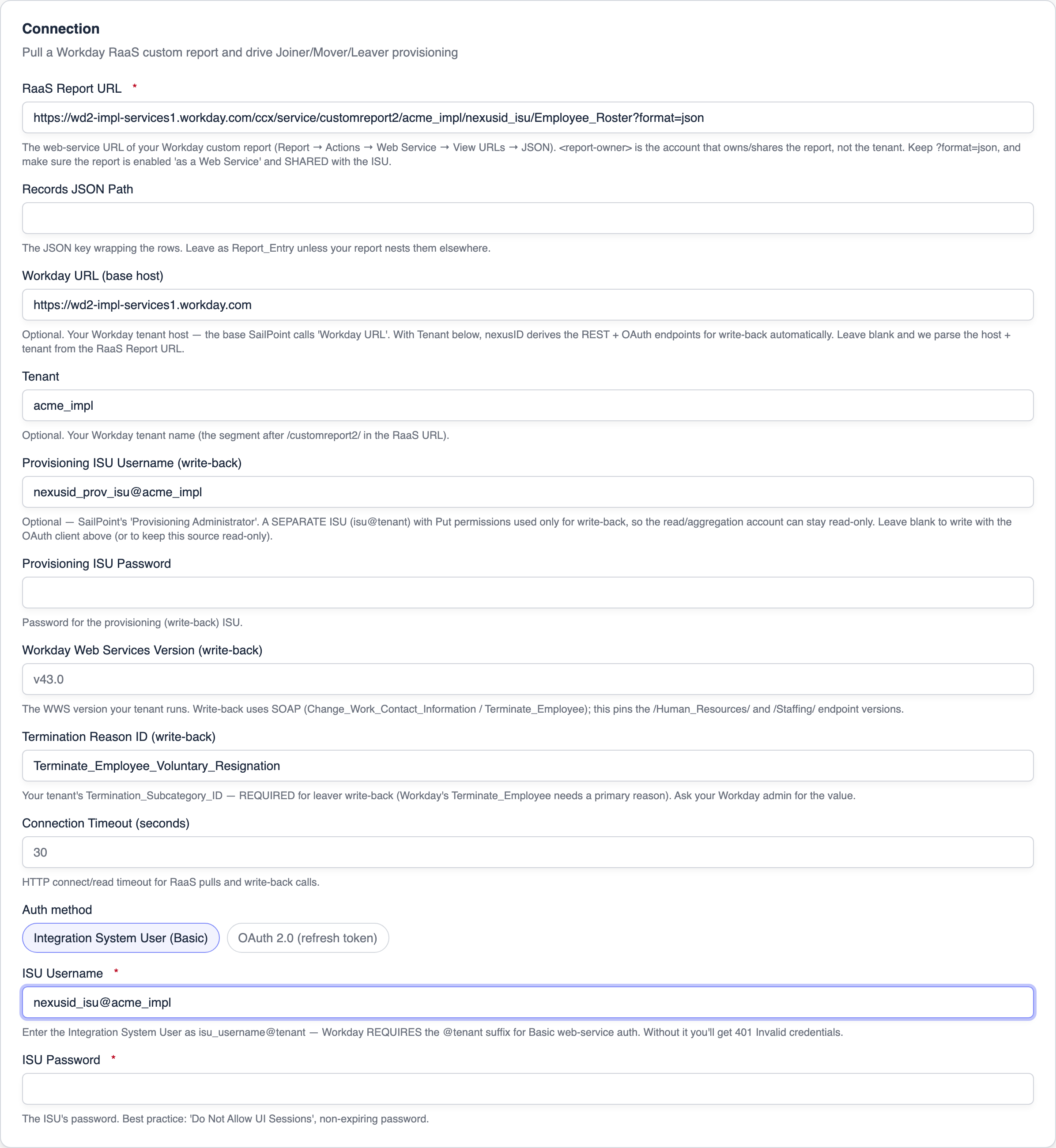
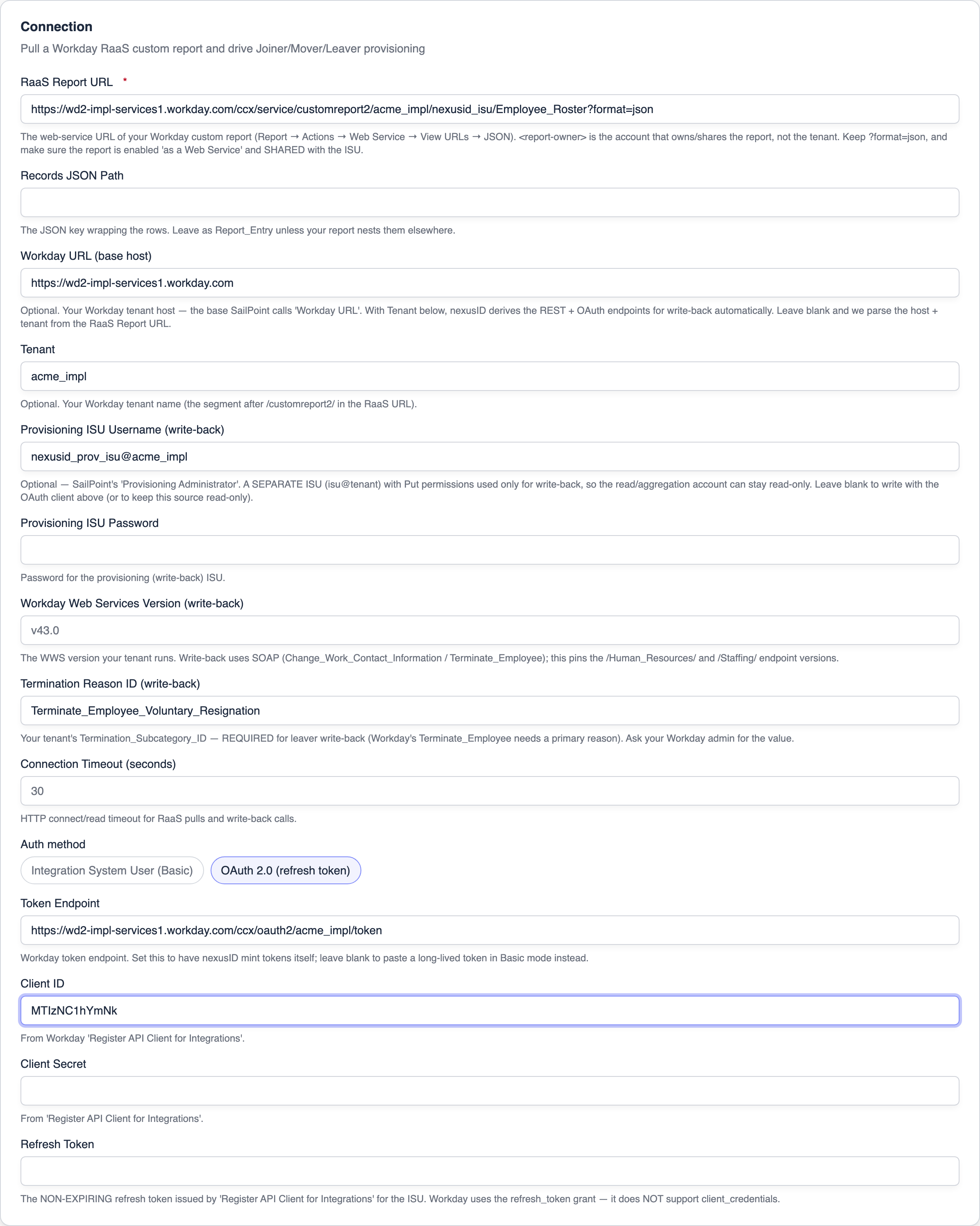
Pick Workday from the provider tiles, name the source, then fill the Connection panel. Workday's RaaS report is the feed: set the RaaS Report URL, and a Records JSON Path only if your report wraps the rows under a key. Then choose one of two auth methods.
Integration System User (Basic) — the common case. nexusID authenticates the report with the ISU username and password:
OAuth 2.0 — for tenants that front RaaS with OAuth. Give nexusID the OAuth Token URL + Client
ID/Secret (and, for the refresh_token grant, a Refresh Token) and it mints the bearer token
itself — no manual paste. Leave the token URL blank to use a pre-issued long-lived token instead:
Secrets are encrypted at rest. Save with Create HR source (or Save changes when editing).
Setup for the Workday ISU team
This is the part that trips people up. The RaaS URL, the ISU account, and the OAuth client are three separate things the Workday admin prepares. Here's exactly what to build and what to hand to nexusID.
1. Create the Integration System User (ISU)
In Workday: Create Integration System User.
- Give it a username (e.g.
nexusid_isu) and a strong password. - Check Do Not Allow UI Sessions, and set the session timeout so the password does not expire.
- Create (or reuse) an Integration System Security Group (ISSG) and add the ISU as a member.
- Grant the ISSG the domain security policies it needs, then Activate Pending Security Policy Changes:
- Reading (this HR source): Get/View on the worker domains your report exposes (e.g. Worker Data: Public Worker Reports, Worker Data: Workers, Worker Data: Current Staffing Information).
- Write-back (optional, for outbound): Put on the domains you'll write — e.g. Worker Data: Contact Information, and Manage: Termination / Worker Data: Business Processes for leaver write-back.
The ISU is not a person's account and should never be used to log into the Workday UI.
2. Build the RaaS report and get its URL
The "RaaS Report URL" is not the ISU account or the tenant URL — it's the URL of one specific custom report you publish as a web service:
-
Create a Custom Report (Advanced), primary business object usually Worker. Add the columns nexusID needs (Employee ID, Email, First/Last Name, Job Title, Department, Manager, Status, etc.).
-
On the report definition, enable Enable As Web Service.
-
Share the report with the ISU (or its ISSG) — otherwise the ISU gets 403/permission denied.
-
Get the URL: report Actions → Web Service → View URLs → JSON. It looks like:
https://<host>/ccx/service/customreport2/<tenant>/<report-owner>/<Report_Name>?format=jsonPart What it is Example <host>your Workday data-center host wd2-impl-services1.workday.com<tenant>your Workday tenant name acme_impl<report-owner>the account that owns/shares the report (often the ISU or the report author) nexusid_isu<Report_Name>the exact report name nexusID_Employee_Roster?format=jsonrequired — nexusID reads JSON, not XML Paste this whole string into RaaS Report URL.
RaaS report requirements (share this with your Workday consultant)
nexusID consumes a Workday Advanced custom report exposed as a web service. Requirements:
-
Report type: Advanced, primary business object = Worker (one row per worker).
-
Enable As Web Service = on; delivered as JSON (
?format=json), rows underReport_Entry. -
Shared with the ISU (or its ISSG) so the integration account can run it.
-
Include one worker per row for the whole population you want governed — active workers, and terminated workers you want nexusID to see as leavers (don't pre-filter terminations out of the report if you want offboarding to fire).
-
Columns — nexusID reads these by default (column names are tenant-defined and remappable in the admin UI, but matching these names needs zero config):
nexusID attribute Default column Notes employeeIdEmployee_IDRequired — the stable match key. emailEmailWork email. firstName/lastNameFirst_Name/Last_NamejobTitleJob_TitledepartmentDepartmentmanagerManagerDisplay name (optional — see Manager_ID). managerIdManager_IDThe manager's Employee_ID(Workday "Supervisor"), used for manager correlation.statusStatusEmployment status — required for leaver detection. -
Status values: nexusID treats
TERMINATED,TERMED,INACTIVEas leavers by default (configurable per source). Your report's status column should surface a value in that vocabulary (or tell us which values mean "left"). -
Extra columns are fine: any column beyond the list above is captured as a governed custom attribute and can be mapped in the Mapping Studio. Optional common additions:
Start_Date,End_Date(drive dated provision/deprovision), phone, location, cost center. -
Effective-dated data: the report should reflect the worker's current effective-dated values (a standard "as of today" report). nexusID pulls the report as-is on each scheduled run.
3. Choose auth and enter credentials
Option A — Integration System User (Basic) — the common case:
- ISU Username: enter it as
isu_username@tenant— e.g.nexusid_isu@acme_impl. The@tenantsuffix is mandatory for Workday Basic web-service auth; without it you get 401 Invalid credentials. - ISU Password: the ISU's password.
Option B — OAuth 2.0 (refresh token) — when your tenant fronts APIs with OAuth:
- In Workday, Register API Client for Integrations (scoped to the ISU). Workday issues a Client
ID, Client Secret, and a non-expiring Refresh Token, and the token endpoint is
https://<host>/ccx/oauth2/<tenant>/token. - Paste those into Token Endpoint / Client ID / Client Secret / Refresh Token. nexusID mints access tokens itself using the refresh_token grant.
Unlike Okta/Auth0/Gusto, Workday does not support the client_credentials grant for API clients.
It uses the refresh_token grant (or JWT bearer). nexusID's Workday connector is fixed to
refresh_token, so you only ever need Client ID + Client Secret + Refresh Token — there's no
client-credentials option to get wrong.
4. Optional: Workday URL + Tenant (convenience)
Instead of pasting every endpoint, you can give nexusID the Workday URL (base host, e.g.
https://wd2-impl-services1.workday.com) + Tenant (e.g. acme_impl) — the same primitive SailPoint
calls "Workday URL". From those, nexusID derives the write-back REST endpoint
({host}/ccx/api/v1/{tenant}) and OAuth token endpoint ({host}/ccx/oauth2/{tenant}/token)
automatically. If you leave them blank, nexusID parses the host + tenant out of the RaaS Report URL — so
this is purely a convenience; nothing breaks without it.
5. Read-only reads + a separate Provisioning account (write-back)
SailPoint separates the Connection account (aggregation) from the Provisioning Administrator (write) so the read account can be least-privilege read-only. nexusID does the same:
- Read / aggregation uses the connection credentials (Basic ISU or OAuth) with only Get/View domain permissions.
- Write-back uses the Provisioning ISU — a separate account with Put permissions. Fill
Provisioning ISU Username (
isu@tenant) + Password on the connection. When present, nexusID uses it (Basic) for all write-back and leaves your read account untouched. - If you don't set a provisioning account, write-back falls back to the connection's OAuth client (so OAuth-only tenants can still write) — but the recommended, least-privilege setup is a dedicated provisioning ISU.
Write-back only activates once a usable write account + endpoint are present.
| Read (aggregation) | Write (provisioning) | |
|---|---|---|
| Account | Connection ISU / OAuth client | Separate Provisioning ISU (or OAuth fallback) |
| Permissions | Get/View domains | Put domains (Contact Info, Termination, …) |
| Transport | RaaS report (GET, JSON) | SOAP Web Services (Human_Resources, Staffing) |
| Auth | Basic @tenant / OAuth Bearer | WS-Security UsernameToken (ISU) / OAuth Bearer |
How write-back works (SOAP)
Workday's REST API doesn't expose a universal contact-info/termination write, so — like SailPoint — nexusID writes via SOAP Web Services, addressed from the Workday URL + Tenant:
- Mover / attribute change →
Change_Work_Contact_Informationon{host}/ccx/service/{tenant}/Human_Resources/{version}— pushes the loop-guarded work email / work & mobile phone. (Job/department are Workday-owned staffing events and are deliberately not written back.) - Leaver →
Terminate_Employeeon{host}/ccx/service/{tenant}/Staffing/{version}.
Two values are tenant-specific and must be entered on the connection:
- Workday Web Services Version (e.g.
v43.0) — the WWS version your tenant runs; it pins the endpoint versions. - Termination Reason ID — your tenant's
Termination_Subcategory_ID(ask your Workday admin).Terminate_Employeerequires a primary reason, so leaver write-back is skipped until this is set.
The SOAP envelopes are built to the Workday WWS bsvc schema, but reason references, phone device
types, and the WWS version vary by tenant. Test write-back against your Workday implementation/sandbox
tenant before enabling it in production. Write-back is best-effort and never blocks the triggering
lifecycle event.
The three Workday channels — and how they coexist
You may end up with up to three Workday connections. They serve different directions and coexist cleanly:
| Channel | Direction | What it does | Credentials |
|---|---|---|---|
| RaaS pull (this HR source) | Workday → nexusID (scheduled read) | Pulls the roster on a schedule → JML | ISU (Basic @tenant) or OAuth refresh_token |
| Workday RTS push (on the Relying Party) | Workday → nexusID (event push) | Workday Studio/EIB posts changes to nexusID's HR-sync webhook for near-real-time updates | a webhook secret / API key nexusID issues — not Workday creds |
| Write-back (WD outbound) | nexusID → Workday (write) | Pushes mapped attribute/contact changes and leaver termination back to Workday | OAuth API Client (refresh_token) or an ISU with Put permissions |
Why they don't collide:
- Both inbound paths (RaaS pull + RTS push) report source
WORKDAY, so HR source precedence treats them as one system of record — no double-counting, no fighting. Use RTS for immediacy and RaaS as the reconciling baseline (e.g. hourly), or either alone. - Write-back is loop-guarded. A field Workday itself asserted (its recorded provenance is Workday) is never written back to Workday, so inbound (RaaS/RTS) and outbound can't ping-pong. The Mapping Studio authority preview shows, per user, exactly which fields would push vs. be guarded.
Recommended shape for most tenants: RaaS pull (Basic ISU) as the authoritative read, RTS push for near-real-time movers/leavers if you've built the Workday-side integration, and write-back only for the specific attributes you want nexusID to own back into Workday (usually contact info + terminations).
The WORKDAY_SYNC_* variables below are an optional alternative for GitOps / air-gapped deployments
that keep secrets out of the database. They're off by default — most operators should use the
admin console above.
Configuration (env, legacy)
WORKDAY_SYNC_ENABLED=true
WORKDAY_SYNC_REPORT_URL=https://<host>/ccx/service/customreport2/<tenant>/<isu>/<report>?format=json
WORKDAY_SYNC_AUTH_STYLE=BASIC        # BASIC (Integration System User) | BEARER (OAuth2)
WORKDAY_SYNC_USERNAME=...  WORKDAY_SYNC_PASSWORD=...
# or, for BEARER:
WORKDAY_SYNC_TOKEN=...
WORKDAY_SYNC_CRON="0 0 0,6,12,18 * * *"
nexusID GETs the report URL, reads the Report_Entry array, and maps each row.
Field mapping (report columns → identity)
Report columns are tenant-defined; defaults assume conventional names and are overridable:
| Canonical | Default column |
|---|---|
employeeId (required) | Employee_ID |
email | Email |
firstName / lastName | First_Name / Last_Name |
jobTitle | Job_Title |
department | Department |
manager | Manager |
status | Status |
A leaver is detected when status resolves to TERMINATED / TERMED / INACTIVE. Design your RaaS
report to expose a status column (or point status at the column your report uses).
Mapping attributes — both ways (Mapping Studio)
Correlation (below) only decides which identity a record belongs to. To map the fields themselves — Workday → nexusID and nexusID → Workday — use the Mapping Studio, nexusID's equivalent of SailPoint's Account Attribute Mappings + Attribute Sync screens.
Open it: Admin → HR Sources → Field Mappings (top-right), or the Map attributes in the Mapping Studio button on the Workday source's Account correlation panel. Then pick your Workday source at the top of the page.
How it maps to SailPoint
| SailPoint | nexusID (Mapping Studio) |
|---|---|
| Account Schema | Discovered native fields — populated automatically on each sync; they feed the Source field picker |
| Account Attribute Mappings (inbound) | Inbound tab: Workday field → identity attribute |
| Provisioning Policy / Attribute Sync (outbound) | Outbound tab: identity attribute → Workday field (loop-guarded) |
| Attribute Sync authority | Attribute Sync — authority preview panel (per user: value · source-of-truth · will-push / guarded) |
Steps
- Run a sync once. nexusID discovers Workday's native fields from the feed and lists them in the Source field picker. Until then it shows "No discovered fields — run a sync."
- In Add mapping, set:
- Direction —
Inbound(Workday → nexusID),Outbound(nexusID → Workday), orBidirectional. - Source field — the native Workday field (e.g.
Primary_Work_Email). - Identity attribute — the nexusID canonical attribute (e.g.
primaryEmail,department,jobTitle,costCenter). - Transform (optional) —
UPPERCASE,LOWERCASE,TRIM,PREFIX(x),SUFFIX(x).
- Direction —
- Save. The row appears under the Inbound / Outbound tab and can be toggled or removed.
What each direction does
- Inbound — during a sync, a mapped native field is renamed to its canonical attribute (with the transform) before the precedence merge, so it lands as a first-class value instead of a stray extra. Unmapped fields still flow into the identity as governed, precedence-tracked metadata.
- Outbound — on a mover/leaver triggered by another source (an admin edit, AD, etc.), the mapped attributes are written back to Workday. Writes are loop-guarded: a field Workday itself owns (its recorded provenance is Workday) is never written back to Workday, so inbound + outbound can't ping-pong.
Authority preview
The Attribute Sync — authority preview panel resolves, for a chosen user, every outbound-mapped field: its current value, the source of truth (provenance), whether the loop-guard would block the write-back, and the net will-push / guarded decision — before anything is written.
Account correlation (join key)
By default nexusID correlates a Workday record to an identity by Employee ID ↔ Employee ID. To key
on a different field (SailPoint's Account Correlation, e.g. Employee Number = FILENUMBER), open the
Workday source and set the Account correlation panel: the Identity attribute (nexusID side) and
the Source field (Workday side). Email-shaped keys are matched case-insensitively. Leave both at
Employee ID to keep the default behaviour. Manager correlation already resolves the record's
managerId (the manager's employee number) to the manager identity.
Aggregation safety (deletion threshold)
To protect against a corrupted or truncated feed mass-deprovisioning accounts, each source enforces a deletion %-threshold (SailPoint's Percentage of Deleted Accounts Allowed). If a single sync would soft-delete more than the configured share of the accounts it matched — default 50% over ≥10 matched accounts — nexusID cancels that sync's terminations (non-destructive creates/updates still apply), logs it, and warns the admin. Tune it (e.g. 20%) in the source's Aggregation safety panel.
Precedence & outbound
Workday is the highest default in the HR source precedence order. Outbound write-back to Workday (loop-guarded contact info + termination) runs over SOAP Web Services using the separate Provisioning ISU, as described above. Deeper staffing events (job changes, hires) stay Workday-owned and are not written back.
Connection Parameters
- Connection Timeout (seconds) — HTTP connect/read timeout for RaaS pulls and write-back calls.
- Page Size / Aggregation Thread Size (not applicable to RaaS) — SailPoint exposes these for its
account-based, paged, parallel aggregation. A Workday RaaS report returns the whole dataset in a
single
GET, so there's nothing to page or thread today. Incremental/delta aggregation is on the roadmap; these knobs arrive with it. - Effective Time Zone — nexusID stores HR dates as calendar dates (timezone-agnostic), so a separate effective-timezone setting isn't required for the current JML flow.
Where it lives in code
- Provider:
modules/integration/hr-workday/.../WorkdayProvider.kt(+WorkdayApiClient.kt) - Connector + scheduler + config:
modules/api/scim/.../connector/workday/ - Push (RTS) path:
WorkdayRtsConfig+HrSyncService+/api/hr-sync/{key}/webhook