Audit Logs
Audit Logs provide a complete, immutable record of administrative and security-related actions performed within Identity Broker.
They are designed to help security teams, auditors, and administrators maintain visibility, accountability, and compliance.
Audit Logs Overview
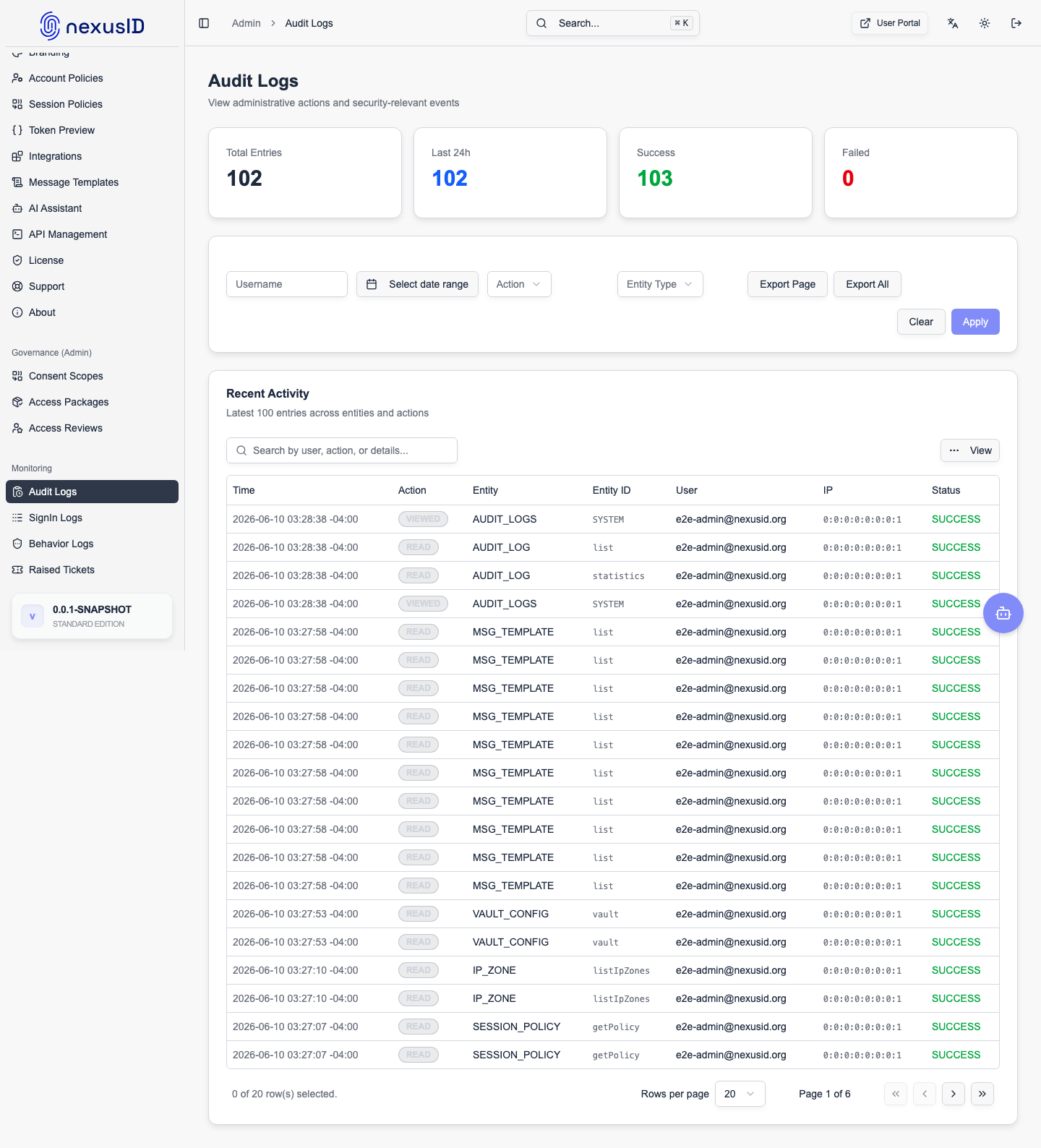
The Audit Logs screen consolidates all critical system activities into a single, searchable view.
It captures:
- Administrative actions
- Configuration changes
- Authentication-related events
- Secret and vault access
- Session lifecycle events
Summary Metrics
At the top of the screen, high-level metrics provide a quick health overview:
Total Logs
Total number of audit events recorded in the system.
Failed Actions
Number of operations that were attempted but did not complete successfully.
Useful for identifying misconfigurations or suspicious activity.
Secret Access
Tracks how often sensitive secrets (such as client credentials) were accessed.
Recent Changes
Highlights the number of recent administrative or configuration updates.
Account Linking Audit Logs
The Account Linking Audit provides a detailed trail of all identity consolidation events.
- IDENTITY_LINKED: Recorded when a new IDP identity is successfully linked to an account (either automatically via rules or manually by an admin).
- IDENTITY_UNLINKED: Logged when a link is removed.
- PRIMARY_IDENTITY_CHANGED: Tracks when the primary source for a user's profile is updated.
- AUTO_LINK_MATCH: Records when a matching rule was successfully triggered during authentication.
OBO Token Exchange History
For environments using microservices, the OBO Exchange History is critical for monitoring service-to-service delegation.
- Source & Target Clients: Identifies which middle-tier service requested a token for which downstream service.
- User Subject: Shows which user the delegation was performed on behalf of.
- Requested Scopes: Tracks the permissions requested during the exchange.
- Success/Failure: Provides detailed error codes if a token exchange was rejected (e.g., due to token replay or invalid delegation relationship).
Filtering and Search
Audit Logs include powerful filtering options to quickly narrow down events.
Available Filters
-
Action
Filter by operation type such as LOGIN, READ, UPDATE, DELETE, SESSION_TIMEOUT, etc. -
Entity Type
Filter by the affected system component (e.g., Admin Session, Vault Config, RP Client). -
Username
Search for actions performed by a specific administrator. -
Time Range
View logs from a specific period or the full history.
Use Clear Filters to reset all selections.
Audit Log Table
Each row in the table represents a single audited event.
Timestamp
The exact date and time when the event occurred.
Action
The operation that was performed.
Examples include:
- LOGIN
- SESSION_TIMEOUT
- READ
- UPDATE
- DELETE
Entity
The resource or component affected by the action, such as:
- Admin sessions
- Vault configuration
- Identity provider settings
- Domain mappings
Username
The authenticated administrator account responsible for the action.
IP Address
The originating IP address of the request when available.
This helps with forensic analysis and anomaly detection.
Status
Indicates whether the operation was successful or failed.
Common Use Cases
Security Auditing
Track administrative access, configuration changes, and sensitive operations.
Compliance and Governance
Maintain an audit trail required for internal reviews or external compliance standards.
Incident Investigation
Correlate authentication failures or configuration changes during incident analysis.
Change Tracking
Identify when, how, and by whom system settings were modified.
Best Practices
- Review Audit Logs regularly
- Monitor failed actions for anomalies
- Export logs for long-term retention if required
- Avoid sharing audit data publicly
- Do not disable logging in production environments
Related Sections
- Sign-In Logs – User authentication activity
- Vault – Secret and key management
- Federated Identity Providers
- Domain Mappings
Audit Logs are a core security feature of Identity Broker, ensuring transparency, traceability, and trust across all administrative operations.