Sign-In Logs
The Sign-In Logs section provides detailed visibility into user authentication activity across Identity Broker and all federated identity providers.
This page is essential for security monitoring, troubleshooting authentication issues, and auditing user access patterns.
Overview
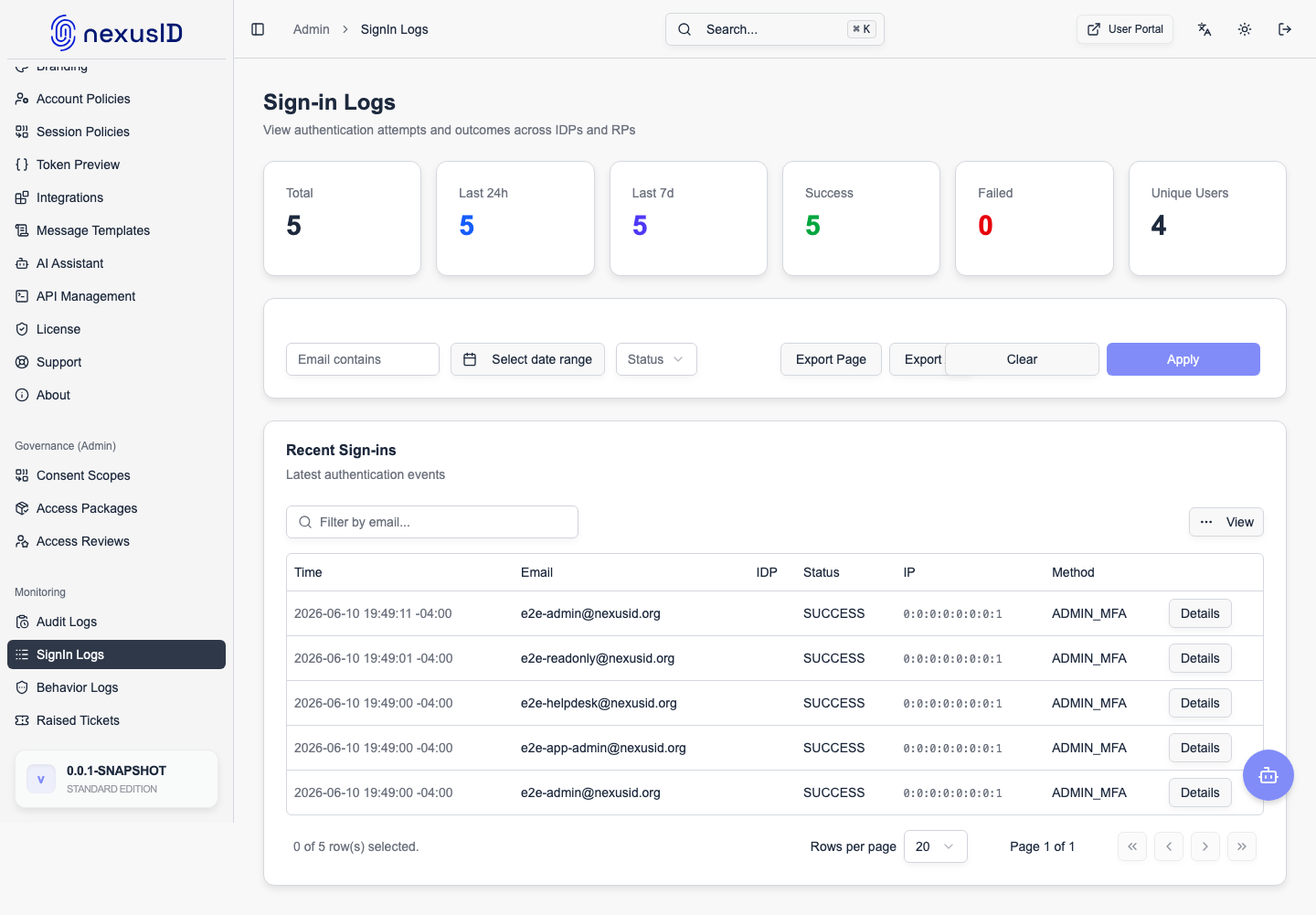
The dashboard displays real-time and historical authentication data, including successful and failed sign-in attempts.
Key Metrics
At the top of the page, summary cards provide a quick overview of authentication activity:
- Total Sign-Ins – Total authentication attempts recorded
- Successful – Successfully completed authentication flows
- Failed – Failed sign-in attempts
- Last 24 Hours – Activity in the past 24 hours
- Last 7 Days – Authentication volume over the last week
- Unique Users – Number of distinct users authenticated
These metrics help administrators quickly detect anomalies or spikes in activity.
Filtering & Search
The Sign-In Logs table supports powerful filtering options:
Available Filters
- Email Filter – Search authentication events by user email
- Status Filter – Filter by authentication outcome (success, failure, token issued, etc.)
- Time Range – View activity across specific time windows
Actions
- Apply Filters – Apply selected filters to the log table
- Clear – Reset all filters
- Download Log File – Export sign-in logs for offline analysis or compliance reporting
Log Details Table
Each entry in the log table represents a single authentication-related event.
Columns Explained
- Timestamp – Date and time of the event
- Email – User identity involved in the authentication flow
- IdP – Identity provider used (Broker or federated IdP)
- Status – Authentication outcome
- IP Address – Source IP of the authentication request
- Details – Links to deeper OAuth2/OIDC flow information
Authentication Status Types
Common status values include:
- SUCCESS – User successfully authenticated
- IDP_AUTH_SUCCESS – Upstream identity provider authentication succeeded
- TOKEN_ISSUED – Identity Broker issued tokens to the client
- FAILED – Authentication attempt failed
Each step of the authentication flow is logged independently for full traceability.
OAuth2 Flow Details
Clicking View OAuth2 Flow Details reveals:
- Session identifiers
- Request and response metadata
- Step-by-step authentication flow progress
This is especially useful for:
- Debugging login issues
- Investigating token issuance problems
- Validating multi-tenant routing behavior
Security & Compliance
Sign-In Logs support enterprise security requirements by enabling:
- Continuous authentication monitoring
- Incident response investigations
- Compliance audits (SOC2, ISO, internal security reviews)
- Integration with SIEM systems via log exports
Best Practices
- Regularly review failed authentication attempts
- Monitor IP address patterns for suspicious behavior
- Export logs periodically for long-term retention
- Correlate Sign-In Logs with Audit Logs for full administrative context
Related Sections
- Audit Logs – Administrative and configuration activity
- Federated IDPs – Upstream identity providers
- Domain Mappings – Home Realm Discovery rules
- RP Clients – Applications consuming authentication
Sign-In Logs provide end-to-end visibility into authentication flows, making Identity Broker transparent, auditable, and production-ready for enterprise deployments.